Buy extra credits
Top up your balance with one-time credit packs paid through Stripe. Pack credits are added right after payment and never expire.
Updated · 3 min read
On this page
Credit packs are one-time top-ups. Buy one when your monthly plan credits run low, without changing your plan. Pack credits are added as soon as the payment goes through, and they never expire.
Where to find it
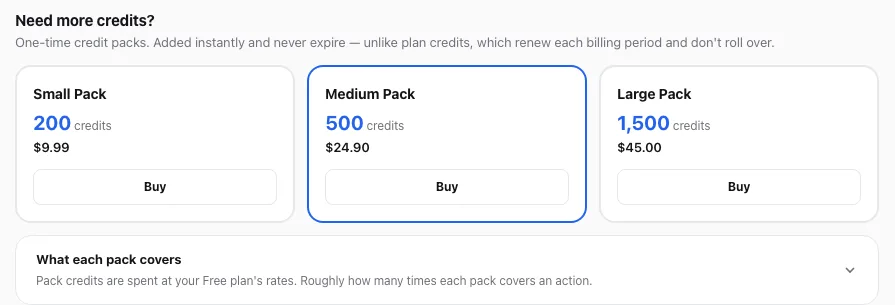
Open Plans and scroll to Need more credits?. These shortcuts take you there too:
- Buy Credits at the bottom of the sidebar.
- Buy credits on the Credits History page.
- Buy Credits on the Settings page.
The packs
| Pack | Credits | Price |
|---|---|---|
| Small Pack | 200 | $9.99 |
| Medium Pack | 500 | $24.90 |
| Large Pack | 1,500 | $45.00 |
Open What each pack covers under the packs to see roughly how many times each pack covers each action at your plan's rates.
Step by step
- Open Settings → Plans and scroll to Need more credits?.
- Click Buy on the pack you want.
- Pay on Stripe's secure checkout page. It's a one-time payment, not a subscription.
- You come back to Plans with Payment received. Your credits will appear in a moment.
What happens next
- The credits are added when Stripe confirms the payment, usually within seconds. Your balance updates in the sidebar.
- Credits History shows a purchase line such as Credit pack: (pack name) (… credits).
- Payment history on the Plans page lists the payment as Credit pack, with a View or PDF link to the Stripe receipt.
- If a storage fee was overdue, it is taken from the new credits automatically, and social accounts frozen for lack of credits are reactivated.
How pack credits are used
- Pack credits never expire. Unlike plan credits, they don't reset at renewal.
- Your plan credits are counted as spent first, so pack credits stay in your balance until your plan credits run out.
- Pack credits are spent at your current plan's rates. If you change plans, the new plan's rates apply.
- You can buy packs on any plan, including the Free plan, and as many as you like.
Credits and limits
- Each pack is a one-time Stripe payment. There is no limit on how many packs you buy.
- If you buy packs regularly, a bigger plan may give you credits at a lower price per credit. Compare the price per credit on the plan cards.
Troubleshooting
"Could not start checkout. Please try again." PallFlow couldn't open Stripe's checkout. Wait a moment and click Buy again.
"Checkout cancelled. No charge was made." You closed the Stripe page before paying. Click Buy again when you're ready.
I paid but my credits haven't arrived. Reload the page after a minute. Check Payment history on the Plans page and Credits History. If the payment is listed but the credits aren't, write to [email protected] with the date and amount.
My balance went down right after buying. An overdue storage fee was taken from the new credits. Look for a Storage for … line in Credits History.