Credits history
See every credit added or spent: plan refills, packs, AI actions, storage and expired plan credits, with filters and a running balance.
Updated · 3 min read
On this page
Credits History lists every change to your balance: credits you received, credits you spent and plan credits that expired. Use it to check what an action cost or why your balance changed.
Where to find it
Click Settings → Credits History in the sidebar, or open Credits History. The page is titled Credit History. For payments in money (card charges and receipts), see Payment history on the Plans page instead.
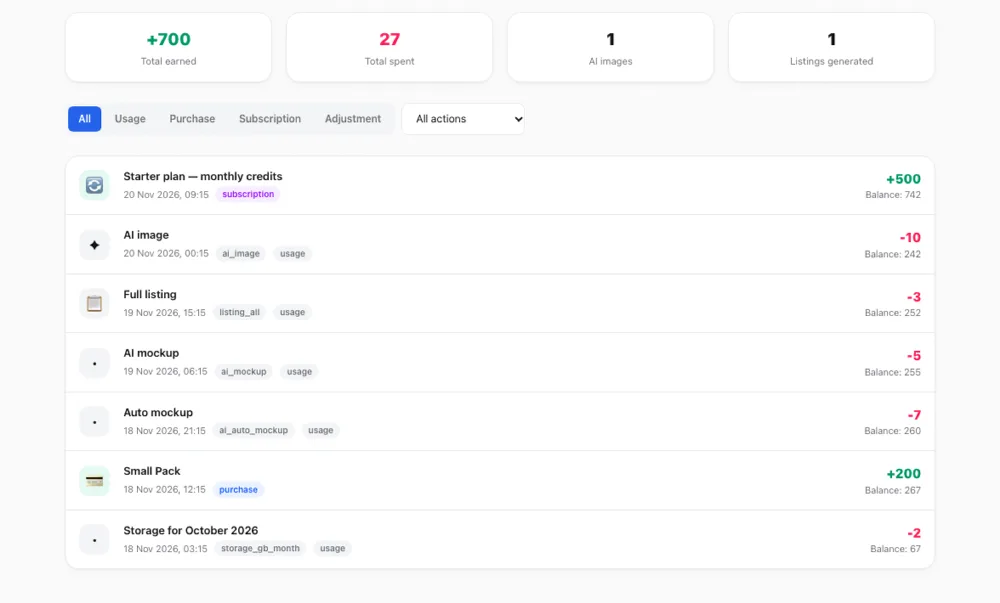
What you'll see
At the top
- Current balance with a Buy credits button that opens the credit packs.
- Four totals for your whole account:
- Total earned — every credit you received.
- Total spent — every credit you used. Expired plan credits aren't counted as spent.
- AI images — how many times you were charged for an AI image.
- Listings generated — how many AI titles, descriptions, tag sets and full listings you were charged for.
The list
Each line shows a description, the date and time, small tags for the action and the type, the amount (green with + when added, red with − when spent) and Balance: your balance right after that line. The newest lines are first, 25 per page.
Filter the list
- The tabs All, Usage, Purchase, Subscription and Adjustment show one type of line.
- All actions narrows the list to one action, for example only AI images. It lists the actions you have actually used.
What the types mean
| Type tag | What it is | Example description |
|---|---|---|
| signup | Your first Free plan credits | Welcome — free plan credits |
| subscription | Plan credits: the monthly Free refill, a paid plan's credits at each renewal, or extra credits after an upgrade | Free plan — monthly credits, (plan) plan credits (…), Upgrade to (plan): prorated credits (…) |
| purchase | A credit pack you bought | Credit pack: (pack name) (… credits) |
| usage | Credits spent on an action or a monthly fee | AI Image Generation, Storage for (month) (avg …), Social account: … |
| expired | Unused plan credits that expired when a new period started | Unused plan credits expired |
| admin_adjustment | A correction made by PallFlow support | Admin adjustment |
The signup and expired lines have no tab of their own; you see them under All.
Credits and limits
The page is free to use. It shows your full history, 25 lines per page.
Troubleshooting
My balance dropped at the start of the month or at renewal. Look for Unused plan credits expired (plan credits don't roll over) and a Storage for … line (the monthly storage fee). See How credits work.
I don't see a charge I expected. Most AI actions are charged only when the result is ready, so a failed generation doesn't appear. Choose All and All actions to clear the filters.
I bought a pack but don't see it. Credits appear once Stripe confirms the payment. Reload after a minute, and check Payment history on the Plans page. If the payment is there but the credits aren't, write to [email protected].
The list is empty. You haven't received or spent any credits yet. Your Free plan credits arrive once you confirm your email address.