Use the eCommerce calendar
See the year's key shopping dates with product ideas and hashtags, filter by category, and get reminder emails before big days.
Updated · 3 min read
On this page
The eCommerce calendar lists the year's key selling dates, such as holidays, shopping events, awareness days and seasonal moments. Each date comes with product ideas and hashtags, so you can plan designs and drops early. PallFlow also emails you before upcoming dates.
Where to find it
Click Sidebar → Calendar, or open eCommerce Calendar.
This is a different page from Social → Calendar, which shows your scheduled social posts. See Posts and the social calendar.
What you'll see
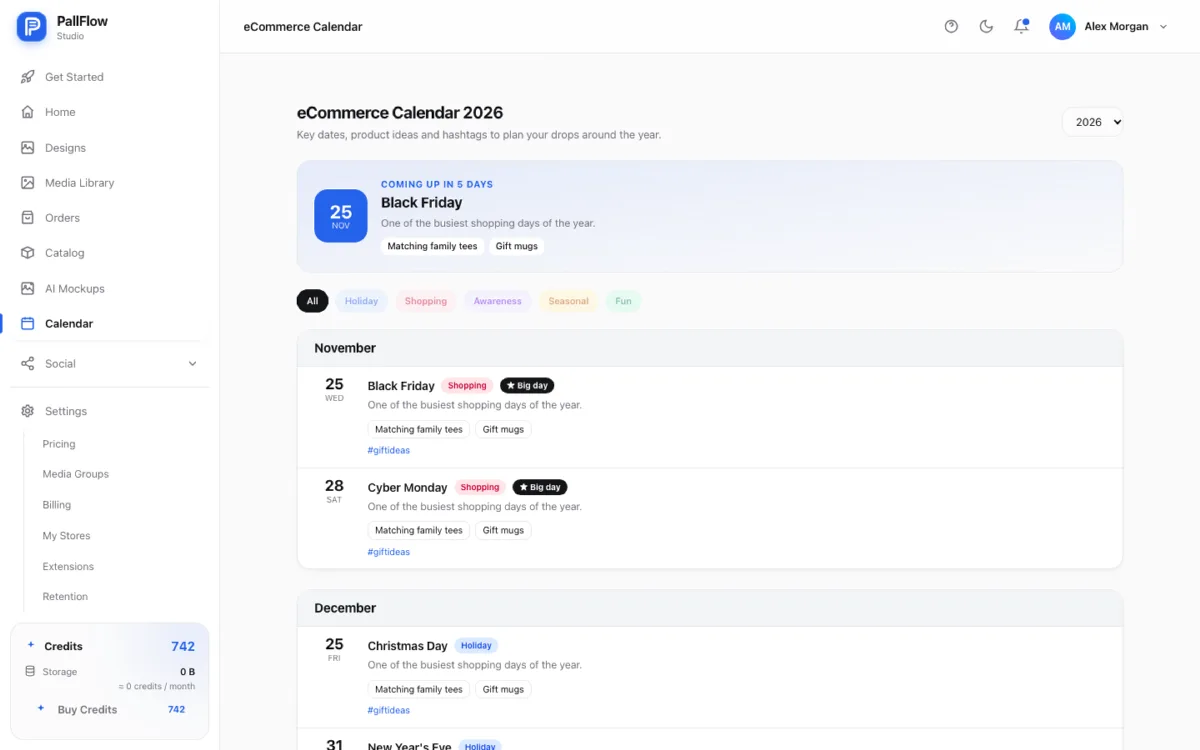
- eCommerce Calendar followed by the year, with the line "Key dates, product ideas and hashtags to plan your drops around the year."
- The next date at the top, in a highlighted card: Happening today, Tomorrow or Coming up in N days, with its title, description and up to four product ideas.
- Category filters: All, Holiday, Shopping, Awareness, Seasonal and Fun.
- One card per month. Each event shows the day and weekday, the title, a category badge, a ★ Big day badge for the biggest dates, a short description, product ideas and hashtags.
Step by step
- Open Sidebar → Calendar.
- Check the card at the top for the next key date.
- Click a category button to show only those events. Click All to see everything again.
- To look at another year, choose it in the year menu at the top right. The menu only appears when more than one year is available.
- Use the product ideas to plan designs. Copy the hashtags into your social posts.
Planning with PallFlow
- Products: create designs early and use scheduling to publish them on the right day.
- Automations: set up an automation for the date. The special days you pick in an automation come from a separate list, and they don't set the dates for you. Set the Start date and End date yourself. See Schedules, daily limits and special days.
- Social: schedule posts with the event's hashtags. See Compose and schedule posts.
Reminder emails
PallFlow emails a digest ahead of key dates. By default you get one 20 days before and another 10 days before a date.
- Emails go out around 09:00 Istanbul time (06:00 UTC), to the email address on your account.
- The subject is "[event name] is in N days — time to prep", or "N key dates coming in N days" when several events fall on the same day.
- Each email lists the events with their date, category, description, Product ideas and Hashtags, plus an Open the calendar button.
- An email is sent only on days when an event is exactly that many days away.
There's currently no setting to turn these emails off for your account. If you don't want them, contact [email protected].
Credits and limits
The calendar and the reminder emails are free and don't use credits.
Troubleshooting
"No calendar for 2028 yet." (with the year you chose) The calendar for that year hasn't been published yet. Pick a year from the year menu.
"No events in this category for …" That category has no events this year. Click All.
I don't get reminder emails Check your spam folder. Emails only go out for dates that are exactly 20 or 10 days away (by default), so some weeks you get none.