Plans: subscribe, upgrade, downgrade or cancel
Choose a monthly plan paid through Stripe, upgrade right away with prorated credits, downgrade at renewal, cancel or resume, and find your receipts.
Updated · 6 min read
On this page
Every account starts on the Free plan. Paid plans give you more credits every month at a lower price per credit; the features are the same on every plan. All plans are monthly and all payments are processed by Stripe.
Where to find it
Click Settings → Plans in the sidebar, or open Plans. The page is titled Plans & Credits. Buy Credits at the bottom of the sidebar opens it too.
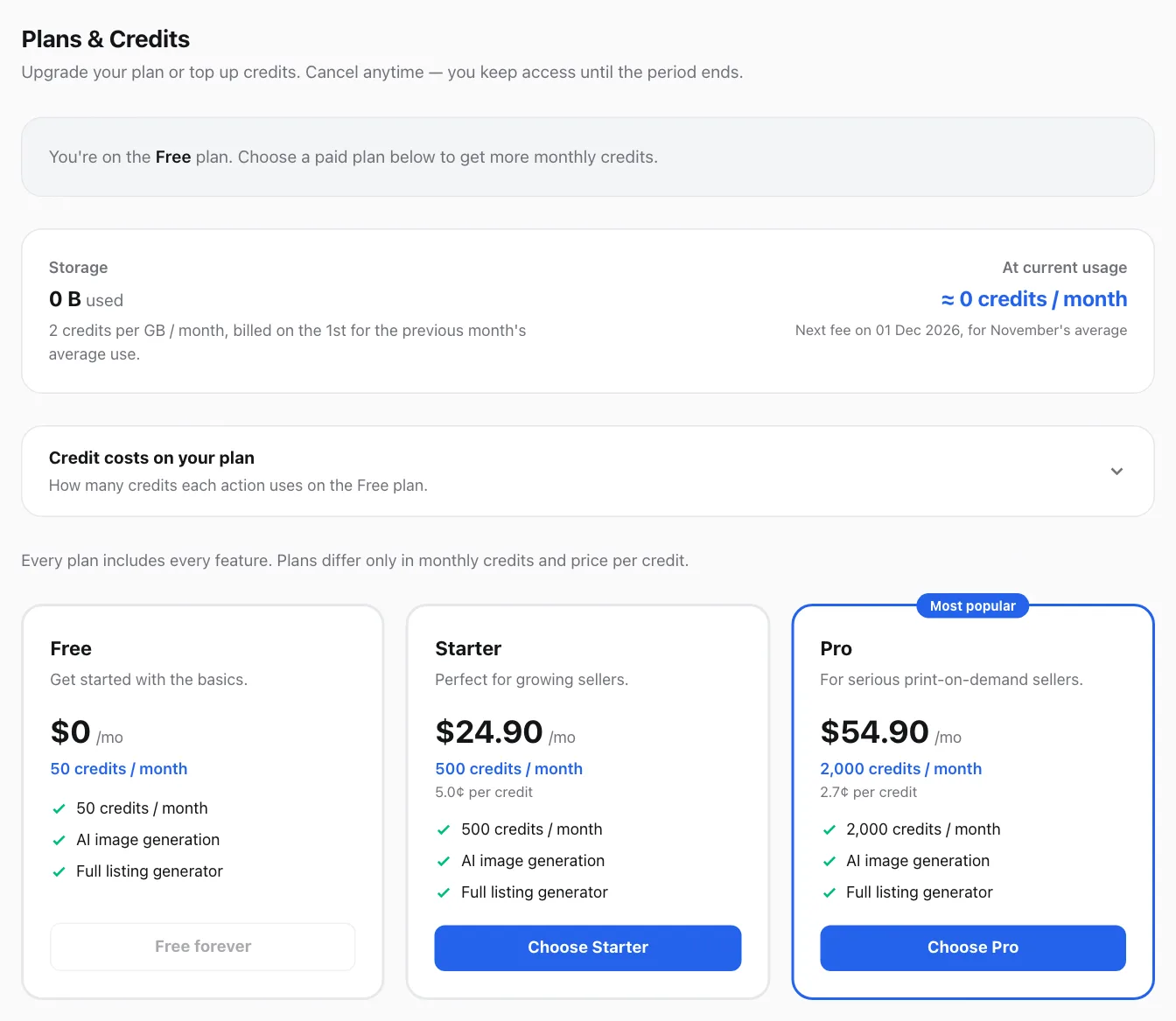
The plans
| Plan | Price | Credits every month |
|---|---|---|
| Free | Free | 50 |
| Starter | $24.90/mo | 500 |
| Pro | $54.90/mo | 2,000 |
Each plan card shows the price per month, the credits per month and the price per credit. Open Credit costs on your plan and Compare credit costs by plan to see what each action costs on each plan, and roughly how many times a plan's monthly credits cover it.
Step by step: subscribe to a paid plan
- Open Settings → Plans. While you are on the Free plan, the page says "You're on the Free plan. Choose a paid plan below to get more monthly credits."
- Click Choose (plan name) on the plan you want.
- Pay on Stripe's secure checkout page.
- You come back to Plans with Payment received. Your subscription is being activated — this may take a few seconds.
When Stripe confirms the payment, the Current plan card shows your plan with Renews (date), and the plan's credits are added to your balance. Unused Free plan credits are replaced; credits from packs stay. If you close the Stripe page without paying, you see Checkout cancelled. No charge was made.
Upgrade
- Click Upgrade to (plan name) on a more expensive plan.
- Confirm: "Upgrade to … now? You'll be charged the difference for the rest of this billing period and get the extra credits right away. Your renewal date stays the same."
The upgrade applies immediately:
- Stripe charges your card the price difference for the days left in the current period.
- You get extra credits for the rest of the period: the difference in monthly credits between the two plans, multiplied by the share of the period that is left. Example: if the new plan has 1,000 more credits a month and half the period is left, you get 500 extra credits.
- Your renewal date stays the same. From the next renewal you pay the new price and get the new plan's full credits.
You'll see "You're now on (plan). We charged the difference for the rest of this billing period and added the extra credits. Your renewal date stays the same."
If your bank asks you to confirm the payment (for example with 3D Secure), you are taken to a Stripe payment page. The upgrade applies once you've paid there.
Downgrade
- Click Switch to (plan name) on a cheaper plan.
- Confirm: "Switch to … on (date)? You keep (current plan) and its credits until then."
Downgrades apply at your next renewal. Until then you keep your current plan and its credits, and you aren't refunded anything. The Current plan card shows Switches to (plan) / monthly on (date) — you keep your current plan until then., and the new plan's card says Scheduled.
Changed your mind? Click Keep (current plan) on your current plan's card. You'll see "You stay on (plan). The scheduled plan change was cancelled."
Cancel
- Click Cancel subscription on the Current plan card.
- In the window, choose a reason under Why are you cancelling? (required). You can add a comment under Anything else you'd like to share? (optional, up to 1000 characters).
- Click Cancel subscription. Click Keep subscription to close the window without cancelling.
You'll see "Your subscription will cancel at the end of the current billing period. You keep access until then." The card shows Cancels on (date) — you keep access until then. You aren't charged again.
When the period ends, your account moves to the Free plan. Remaining plan credits stay until the next Free refill on the 1st, and pack credits never expire. See How credits work.
Resume a cancelled subscription
Before the cancellation date, click Resume subscription on the Current plan card (or Resume (plan name) on its plan card). You'll see "Your subscription has been resumed and will renew as usual." Choosing a different plan while cancelled also resumes your subscription and then changes the plan, so you never pay twice for the same period.
Payment history and your card
- Payment history lists your last 50 payments: Date, Description (Subscription or Credit pack, with the invoice number), Amount, Status and Receipt. Click View (or PDF) to open the Stripe receipt.
- Update payment method under your current plan opens a Stripe page where you change your card. See Failed payments and updating your card.
Credits and limits
- Monthly billing only. Yearly plans aren't available.
- One subscription per account. Upgrades are immediate and prorated; downgrades wait for the renewal.
- Credit costs depend on your current plan. Credits from packs are spent at your current plan's rates.
Troubleshooting
"You are already subscribed to this plan." You chose the plan you already have. Pick a different plan.
"The Free plan does not require payment." The Free plan can't be bought. To go back to Free, cancel your subscription.
"Could not start checkout. Please try again." PallFlow couldn't open Stripe's checkout. Wait a moment and click the plan again. If it keeps happening, write to [email protected].
"Your bank didn't approve the payment for (plan), so your plan wasn't changed. Update your card and try again." The upgrade payment was declined. Click Update payment method, change your card and upgrade again.
"Could not change your plan. Please try again." or "Your subscription was resumed, but we could not change your plan. Please try again." Something went wrong talking to Stripe. Reload the page and try again.
"Your (plan) payment didn't go through. Update your card first — your plan continues as soon as the payment succeeds." Your last renewal failed. See Failed payments and updating your card.
"Please choose a reason for cancelling." Pick one of the reasons in the cancel window before confirming.
"Your subscription is already set to cancel at the end of the period." Nothing more to do. Use Resume subscription if you want to keep it.
"Could not cancel your subscription. Please try again." or "Could not resume your subscription. Please try again." Stripe didn't respond. Try again in a minute.
My plan didn't change after paying. Stripe confirms payments in the background, usually within seconds. Reload the Plans page. If it still hasn't changed after a few minutes, write to [email protected].