Connect social accounts
Link Instagram, Facebook and Pinterest accounts to PallFlow, manage their status and email alerts, and see what each one costs.
Updated · 4 min read
On this page
Social → Connections is where you link the social media accounts PallFlow posts to. You can connect Instagram, Facebook and Pinterest accounts. Each connected account has a monthly credit fee.
Where to find it
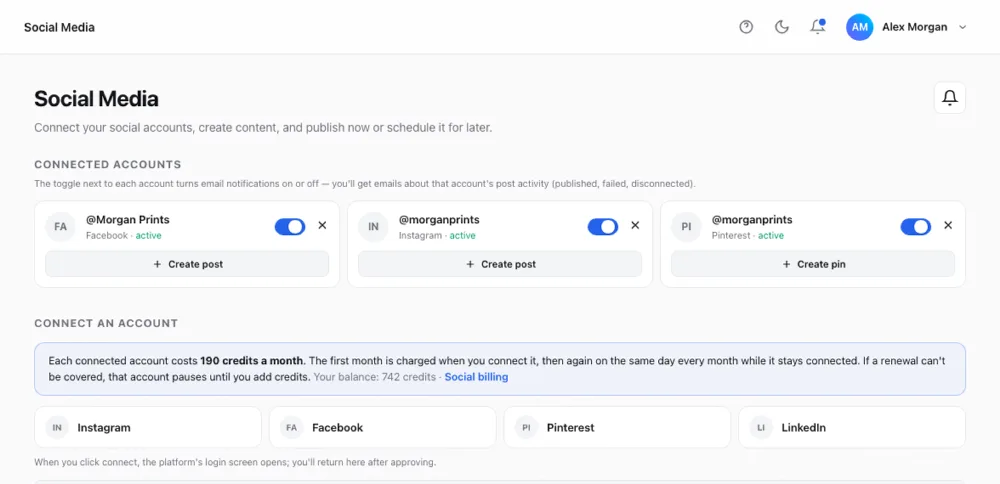
Sidebar → Social → Connections: Connections. The page heading is Social Media.
Before you start
- Credits for the first month. The fee is taken the moment an account connects. The box under Connect an account shows the fee for your next account and your current balance.
- Your social login. You sign in on the platform's own page. PallFlow never sees your social media password.
- Pinterest: you need at least one board on Pinterest before you can schedule pins (not to connect).
Tip: Instagram only lets connected apps publish from professional (Business or Creator) accounts. If Instagram refuses the connection, switch the account to a professional one in the Instagram app and try again.
Supported platforms
| Platform | Where you create content | Formats |
|---|---|---|
| Social → Compose | Feed posts, carousels, stories, videos | |
| Social → Compose | Feed posts, carousels, stories, videos | |
| Pinterest Pin Studio | Pins (image or video), scheduled in batches |
Only these four platforms can be connected at the moment. You can connect more than one account per platform; each account is billed separately.
Step by step
- Open Social → Connections.
- Scroll to Connect an account and read the fee box. It shows what your next account costs per month and your balance.
- Click a platform tile: Instagram, Facebook or Pinterest.
- A dialog asks Connect Instagram? (or the platform you chose). It repeats the fee and your balance. Click the Connect button (its label shows the monthly fee).
- The platform's login screen opens. Sign in and approve the requested access.
- You come back to Connections with a green message, for example "@yourshop connected." The account now appears under Connected accounts.
Managing connected accounts
Each account card under Connected accounts shows:
- Name and platform — the @username, the platform and a status: active, needs reconnect, disconnected, or a warning state.
- Reconnect — appears when the connection is lost. Click it and sign in again.
- Email switch — turns email notifications for this account on or off (on by default). You'll get emails about its posts (published, failed) and its connection. See Analytics and notifications.
- ✕ — removes the account. Confirm with Remove in the Remove this account? dialog.
- Create post (or Create pin for Pinterest) — opens Compose or Pin Studio with this account already selected.
PallFlow checks the health of your accounts every hour. If a platform revokes access (for example after you change your password), the account switches to needs reconnect and you get a notification: "Account disconnected: Instagram" — "Reconnect it to keep posting."
What happens next
- The first month's fee is charged right away. The next charge is one month later, on the same day, as long as the account stays connected.
- If a renewal can't be covered, the account is frozen until you add credits. Frozen accounts show Frozen — add credits on Social → Billing.
- Removing an account stops future charges. The month already paid isn't refunded, and connecting the same account again later starts a new paid month.
- An account that shows needs reconnect or disconnected isn't charged while the connection is lost. When you reconnect it, the fee is charged on the next daily billing run; if the renewal date has passed, a new month starts from that day.
Full details: Social account fees.
Credits and limits
The monthly fee per account depends on how many accounts you have connected in total:
| Account number | Monthly fee per account |
|---|---|
| 1–10 | 190 credits |
| 11–100 | 170 credits |
| 101 and up | 150 credits |
There's no limit on the number of accounts.
Troubleshooting
"Not enough credits to connect an account (… credits needed)." Your balance is below one month's fee. Buy a credit pack or upgrade your plan in Settings → Plans, then try again. PallFlow runs this check even when you click Reconnect on an existing account.
"Connection was cancelled or denied." You closed the platform's window or declined access. Click the platform again and approve all requested permissions.
"Could not start connection: …" The publishing service didn't answer. Wait a few minutes and try again. If it keeps happening, send the full message to [email protected].
"Could not prepare your account, please try again." PallFlow couldn't set up your social workspace. Reload the page and try again.
The account connected but shows "Frozen — add credits" on Social → Billing Your balance dropped below the fee before the connection finished, so the first month couldn't be charged. Add credits; the account reactivates automatically.
The account doesn't appear after you sign in Reload Social → Connections after a minute. PallFlow also picks up new connections in the background.